Spotify, play next
Picture this: you are working in your bed and dive deep into a nostalgia kick, starting to listen to 2010s pop hits. While Troye Sivan's "Happy Little Pill" (a really deep cut I just rediscovered) is playing, you remember another of his early hits – "YOUTH." What an absolute classic song! You just have to play it. You already have a queue of other once-forgotten records, but of course, you want "YOUTH" to be the next song that plays. You also want to maintain the queue you have. What do you do?
Well, if you use Spotify, chances are you have to stop "Happy Little Pill" prematurely and press on "YOUTH" before the top song in your queue plays, and you are forced to go back and add it once more. Alternatively, you can stop what you are doing, enter the app, add the song to your queue, and drag it to the top. It doesn't just seem like a hassle; it is one.
Problem
As a former Spotify user and now an Apple Music convert, I realize that Apple's designers and developers have solved this debacle quite seamlessly.
When pressing down on a song, Apple Music allows users to Play Next or Play Later. The two actions are simply communicated but extremely powerful and efficient for users.
Not to get too deep into programming theory and practice, but Apple Music's dual functionality gives the user the chance to reap the benefits of both FIFO (first in, first out) and LIFO (last in, first out).
FIFO (First In, First Out) and LIFO (Last In, First Out) are two types of data structures used in programming. FIFO processes elements in the order they were added, while LIFO processes the most recently added element first.
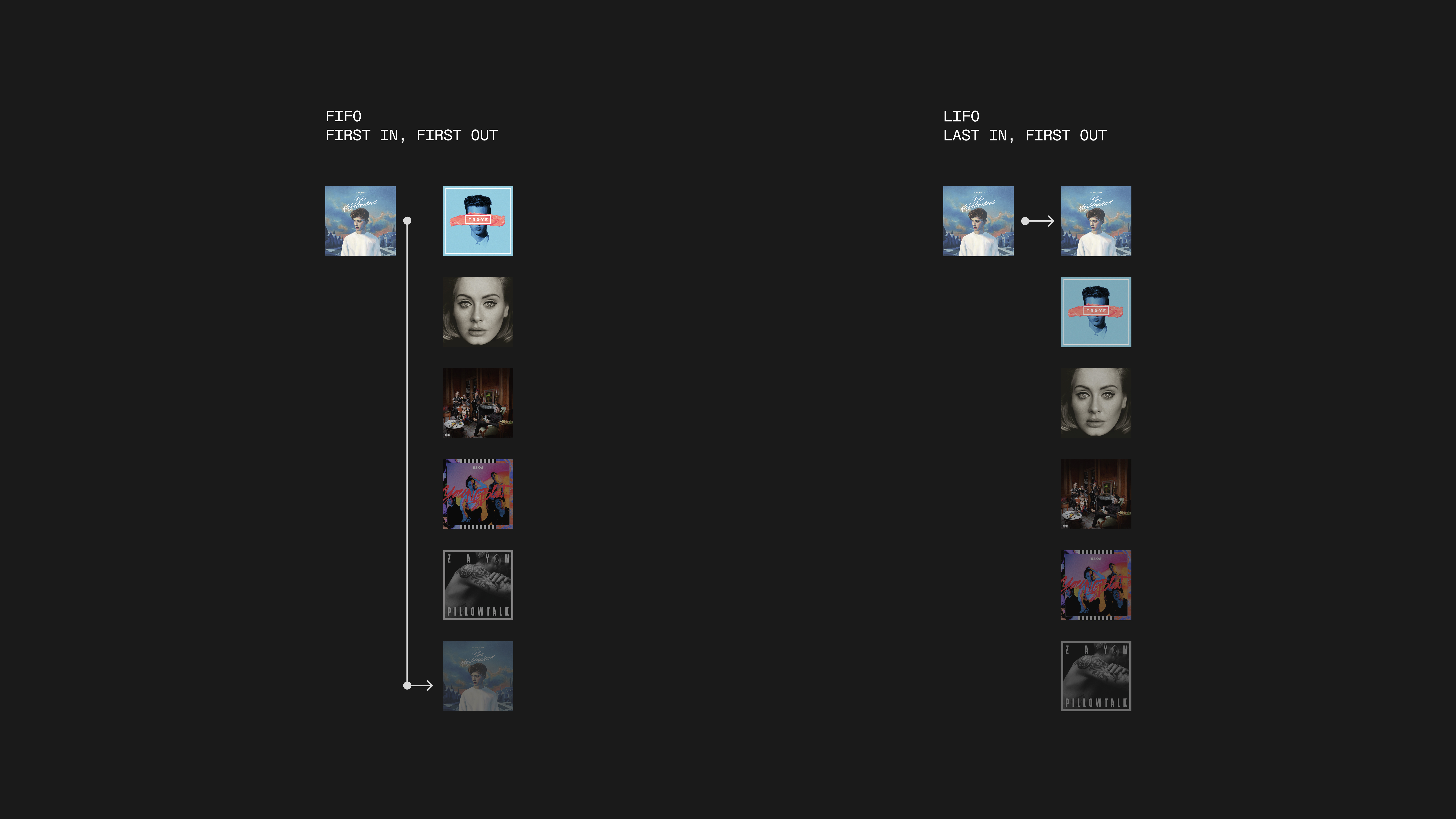
In FIFO, Happy Little Pill would be the last to play as it was the last to enter. But in LIFO, it would immediately play next.
Apple's Play Next feature matches the FIFO practices that are seen in stacks. By pressing one button, the song I have just controlled (which is the last relative to the others in the current stack) can become the first one to play. However, if I want to add something to a list of songs while being content with it playing last, I can employ the queue structure and have it go to the bottom. Using two forms of data structures that are usually seen as oppositional has actually produced a beautiful harmony.
This week's project is to bring this dual functionality to Spotify within its current design language and API capabilities.
Implementation
Development – Raycast extension
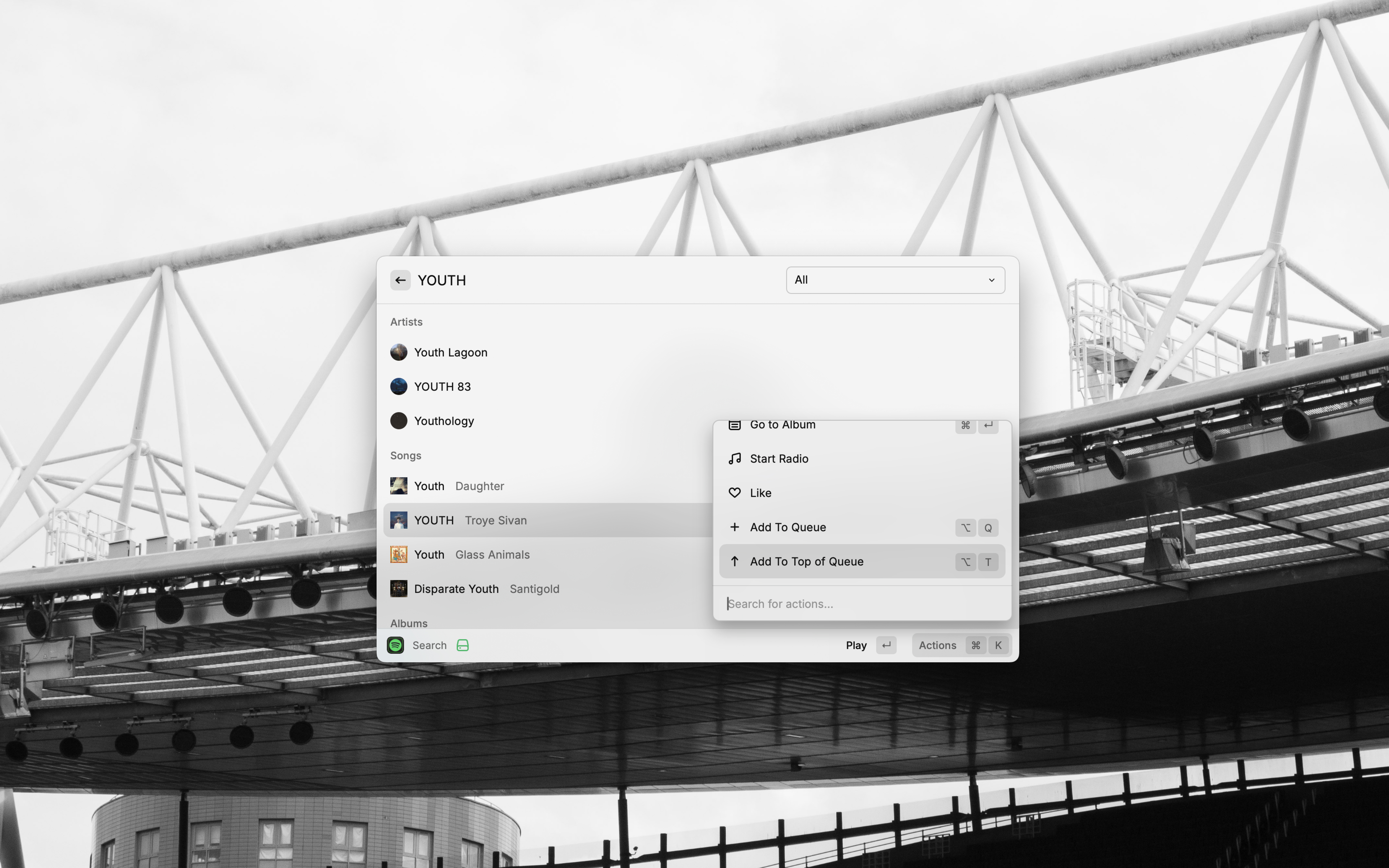
Adding onto the existing extension, I tried to create a "Add To Top of Queue" function.
Hoping to go beyond just design and actually produce a solution to this problem, I instantly looked towards Raycast. One of my favorite apps on my computer for the past three years, Raycast is a launcher (in other words, a replacement for Mac's Spotlight feature) that has a powerful and ever-growing set of extensions. One of them is a Spotify extension that lets users remotely control their music. With Raycast's new AI extension feature, you can even give it a prompt in full natural language and watch as magic happens right in front of you.
As all Raycast extensions are open-source, my goal was to build upon the existing code with the hope that my pull request would be accepted in a later update. Unfortunately, the code would never reach that stage as I concluded the feature is nearly impossible to implement well.
Spotify's API is limiting in the sense that its core purpose is to give developers the ability to present streaming data to existing Spotify users (see Airbuds and Volt.fm). It is not intended to encourage interested parties to expand upon Spotify's functionality or alter the streaming experience. When I first had the idea for this feature, I was eager to dive into the API and quickly solve this problem. I shortly found out that you cannot remove songs from a queue. This will be important in a quick moment. Let's look at the algorithms I attempted to implement.
The commonality between both of them is that to get a new queue where a selected song is at the top, all existing songs need to be removed. The selected song is then added to the now empty queue, and only after this are the previously queued songs all added back in their original order.
Misión Impossible
Almost five years ago, GitHub user nelson-t shared a makeshift algorithm he had created to get around the inability to clear queues.
On a Github post, he shows the following code:
static clearSpotifyQueue(init) { //Recursive
      let i=init;

      //Mission Imposible, my 'tag' track. This can also be changed so that you can send an specific id to the function.
      let id="0ICWP0NnWaJUCgp6EvgNmT";

      let tId="";

      //Max number of tracks in the queue that will be removed
      if(i>=25){setLoops(); return;}

      //the first time send the track to the queue
      if(i===0){

         //specific to my application. Stops updating the UI
         clearInterval(theLoop);
         $.ajax({
            url: 'https://api.spotify.com/v1/me/player/queue?uri=spotify:track:'+id , method:'POST',

            //replace by corresponding headers
            headers: Player.getHeaders()

            //adds some delay before calling the function again, otherwise it won't work
         }).done(setTimeout(function(){Queue.clearSpotifyQueue(i+1);},1000));
      } else {
         $.ajax({
            url: 'https://api.spotify.com/v1/me/player', method: 'GET', headers: Player.getHeaders()
         }).done(function (data) {
            tId = data.item.id;
            if(tId===id) {
               //implements a simple player/next or eliminate if you want to play the 'tag' track
               Player.next(0);

               //specific to my application...change it.
               setLoops();
            } else {
               $.ajax({
                  url: 'https://api.spotify.com/v1/me/player/next', method:'POST', headers: Player.getHeaders()
               }).done(setTimeout(function(){Queue.clearSpotifyQueue(i+1);},2000));
            }
         });
      }
The general idea is to recursively go through the queue, waiting to see if the next song in the queue matches the 'tag' track – in this example, Band of One's Misión Impossible. If there is a match, you can play the song. If not, you skip past it, removing it from the queue.
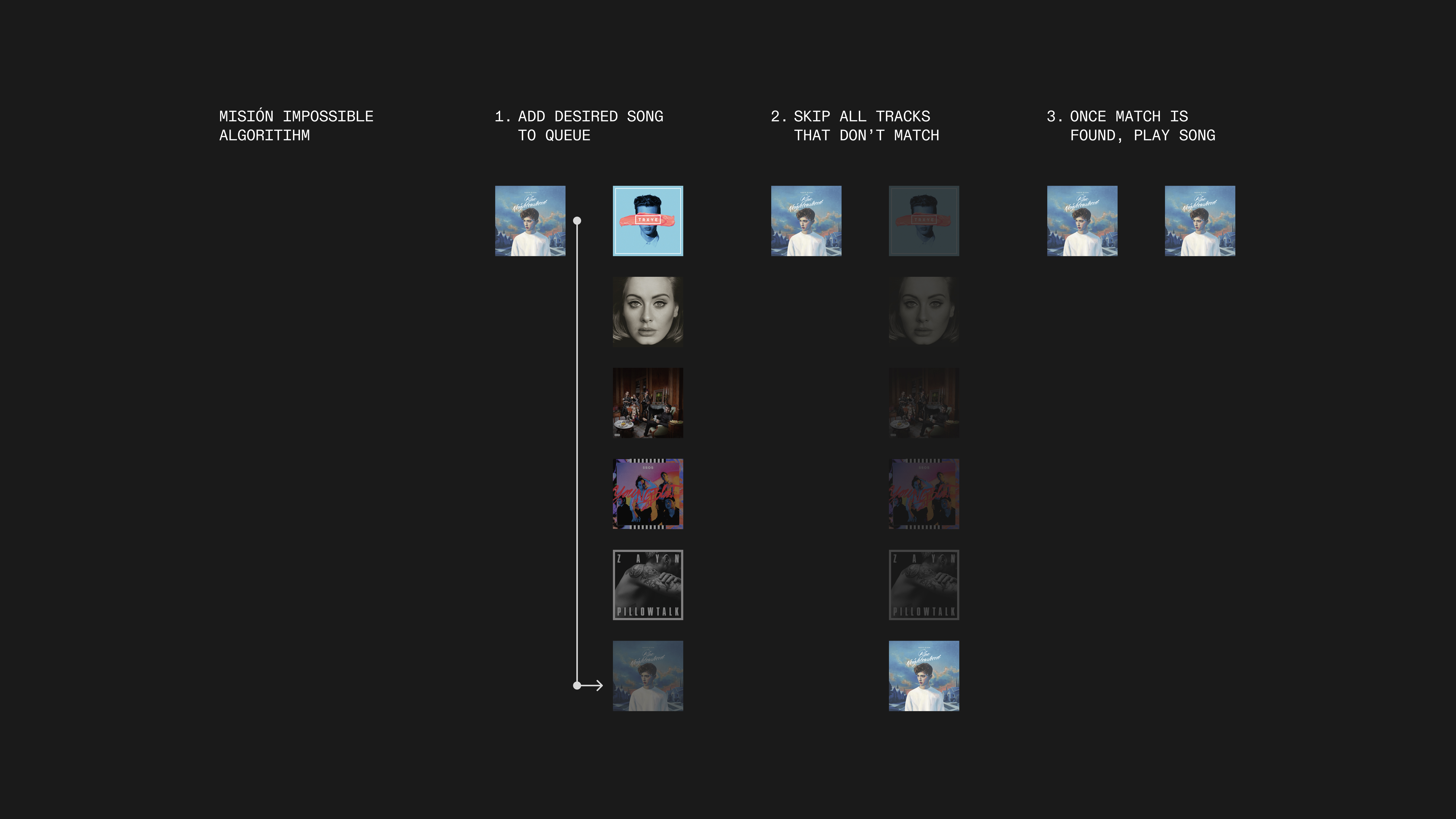
A visualization of nelson-t's Misión Impossible algorithm
I have had this code snippet saved onto my bmrks and cosmos for ages. But when I looked deeper into the code I realized something was glaringly wrong.
Ignoring the fact that this is merely a function to skip tracks and clear a queue – not maintain it – the algorithm does not solve the central issue I meant to tackle in the first place. My feature was meant to be a seamless, single-action button that users could tap. Their streaming would not have to be interrupted, and they would not have to manually reorder the queue either. This feature would compromise the listening experience, as it would quickly play past every song in the queue for a second before finally getting to the desired track. It may not be a great inconvenience with a small list of 10 songs, but when you have a queue of many more tracks, it will take a considerable amount of time for the next song to play.
The main objective of the feature is to let users continue listening to their current song while adding another to play directly afterwards. While it will make the next song that is played for more than a moment the one the user requests, it immediately ends the current song and thus, doesn't meet my threshold.
Temporary Playlist
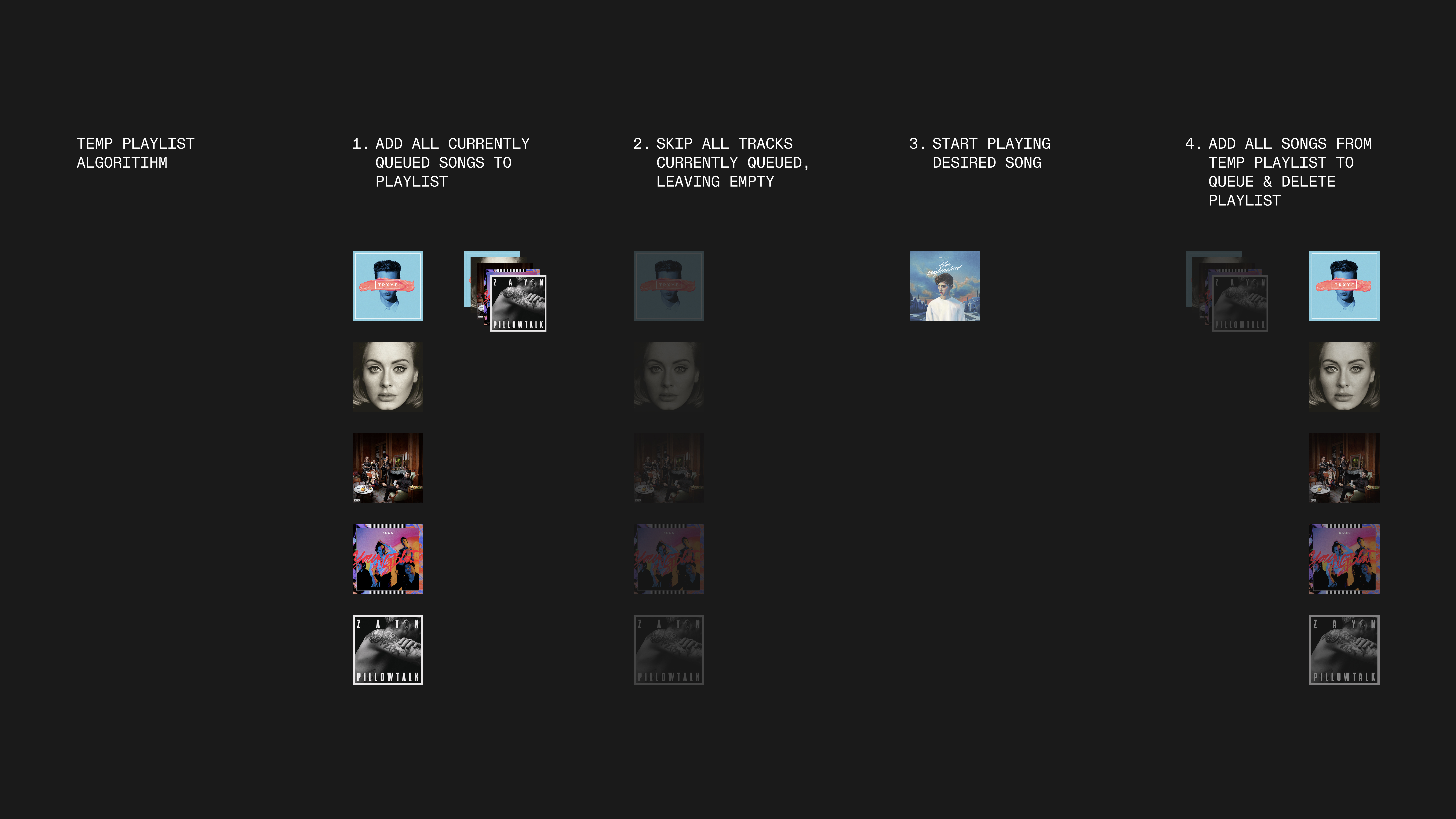
A visualization of the temp playlist algo
Other people trying to solve similar problems thought of creating a temporary playlist to hold the songs in the queue. You would then skip through all the songs in the queue, play the desired song, and then iterate through the playlist and add a track to the queue one by one.
It may seem simpler (the diagram above shows it actually requires more steps) as an algorithm, but it has a deep flaw. Spotify's API does not allow for users to remotely delete playlists. So every time you would use the function, no matter if it is creating a whole new playlist or taking over an existing one, the code cannot delete the playlist by itself.
When I compare this to the Misión Impossible algo, I think this has even more friction. Sure, if you do not mind having a playlist stashed away in your library where you have songs that once belonged to your queue, this won't be too much of an issue. However, the central action of removing a song from the queue is tied to skipping a song, something that cannot be done quickly and quietly in the background. It will immediately end the song you are playing, take moments to pass through all the other queued songs, and then play the song you wanted to hear next. It does the exact same thing current Spotify users are forced to do but requires the intention of opening the Raycast app, searching for a song, and then using the Play Next command. It only makes an uncomfortable experience more burdensome.
Design – reworking Spotify's mobile app
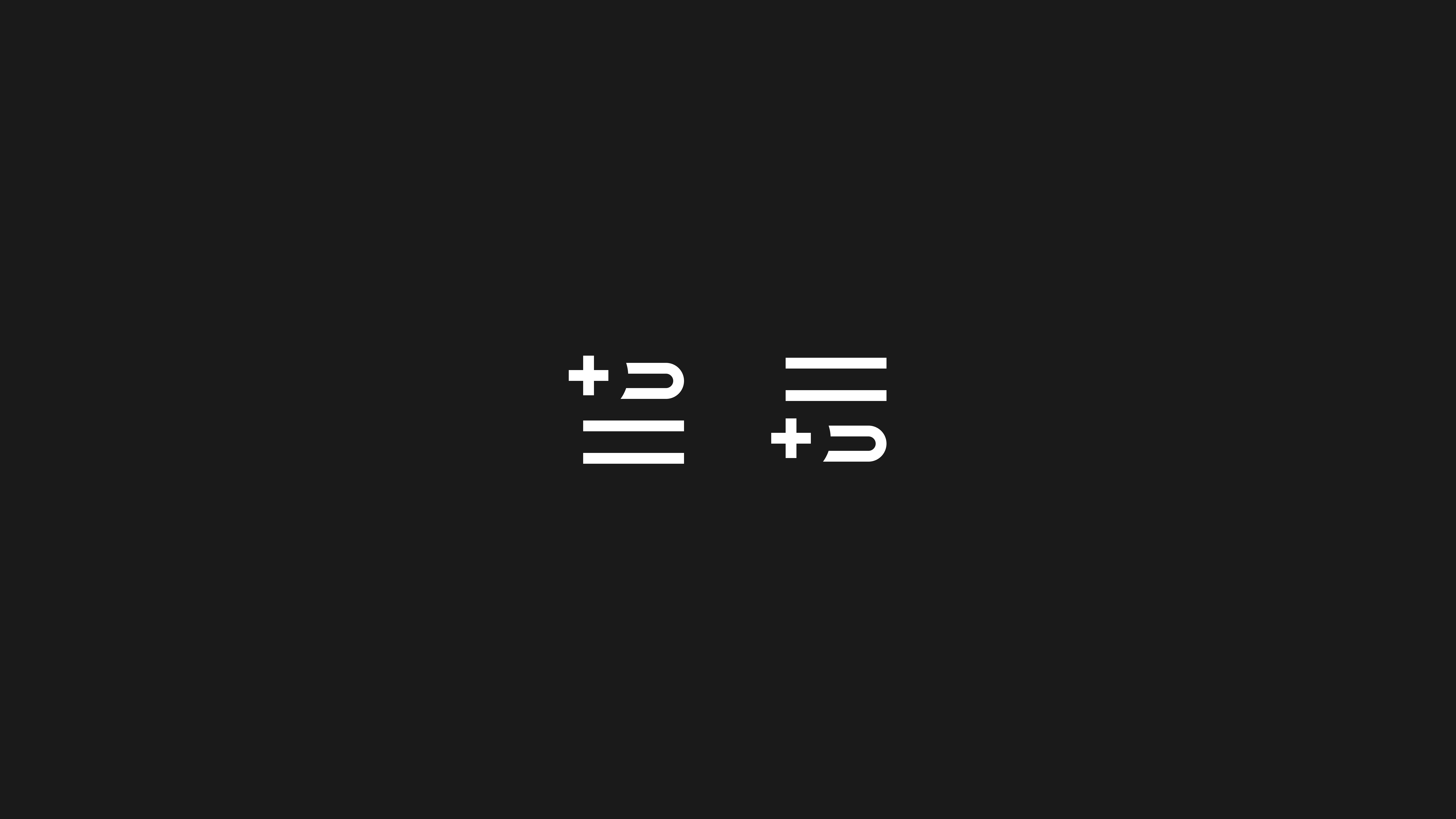
Left: Spotify's existing "add to queue" icon. Right: My new "add to queue" icon.
Realizing that I was not going to be able to implement an actual solution with code, I chose to craft Spotify's mobile app from scratch and add the "Play Next" feature. It was a process that left me questioning whether trying to replace the smallest of icons or the most intricate of details was worth it. However, it became great Figma practice as I was forced to use auto layout and other tools consistently and thoroughly. Spotify is certainly not an app without its fair share of naysayers (link New Yorker piece) about its design, but replicating the UI of such a popular app felt valuable. Anyway, enough of the overarching yapping. Let's get into the changes I made.
Iconography
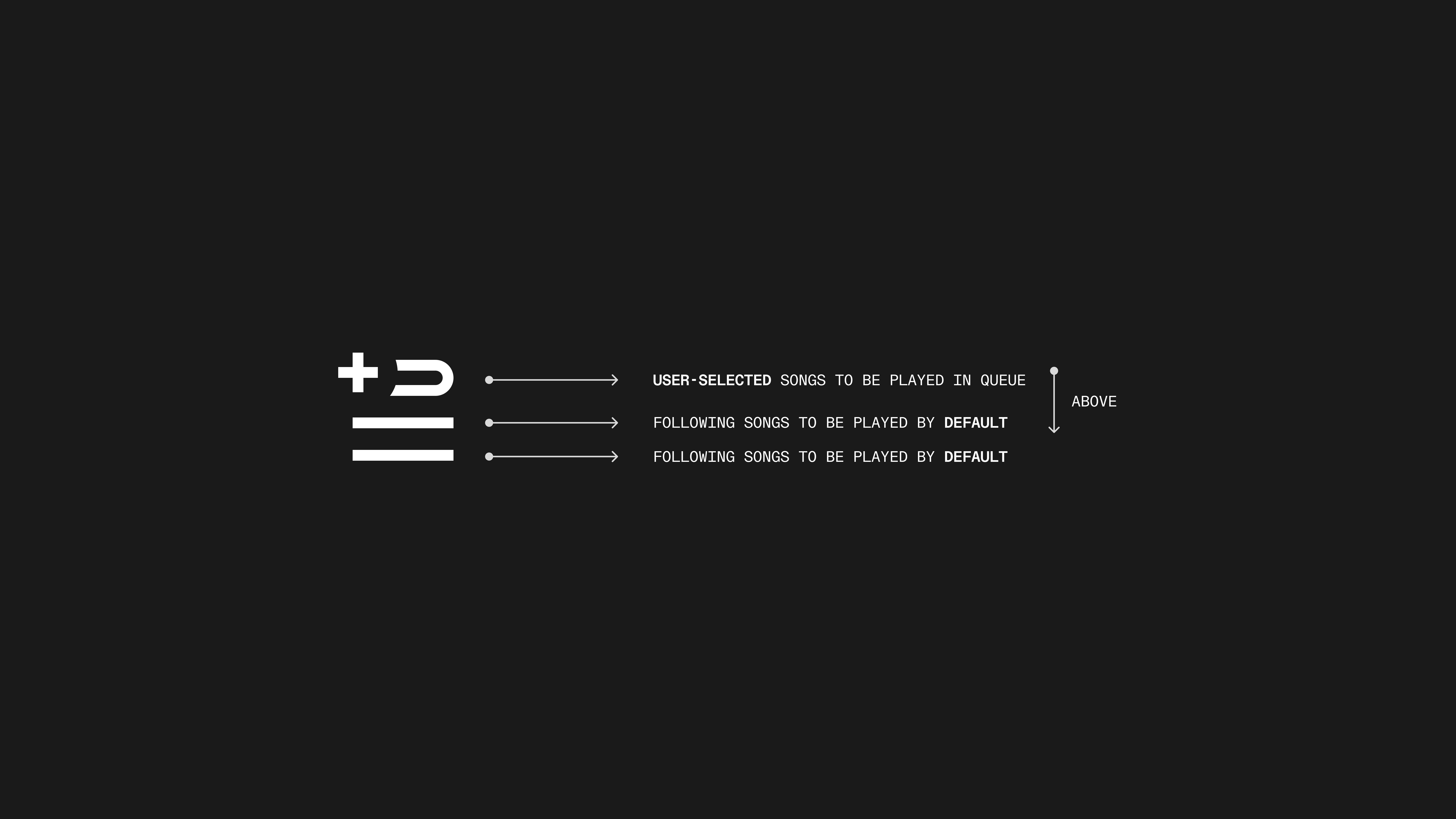
A perhaps over-serious analysis of Spotify's current icon
When I was conceptualizing the tweaks I was going to make, I kept coming back to the "Add to Queue" icon. I knew why it made sense, but at the same time, I felt that it didn't.
The icon has two lines at the bottom, signifying songs that would naturally come after the song currently playing. I use the word "naturally" because there lies a key distinction; these are not songs the user has already queued. These are the songs that come when you shuffle through a playlist or press play on one specific track in an album. Whether these are songs the algorithm has judged to be similar or simply other tracks in whatever music vessel the user has selected, they are whatever will come next by default.
The top of the icon shows a plus symbol whose circular border blends into the background. Adjacent to the plus is part of a rounded path, indicating some sort of motion. When you put all of these individual elements together, the meaning of the icon is clear: press on this, and the song you have selected will move above all the songs we were going to play for you by default. This makes clear sense, but what happens when you already have songs in the queue? What does the symbol mean then?
The icon by itself doesn't have any explanation – if the circular path is meant to suggest that any song added after a queue has been established will start at the bottom of the queue, it certainly doesn't make it clear enough.
I know this because by simply flipping the order of the two central elements and sending the two icons to my friends, everyone judged that the left meant "add to the top of the queue," while the right meant "add to the bottom."
The icon in its current usage has meanings I do not think are clear enough when standing on its own. However, I do not think it needs to be torn apart. By simply adding its opposite form alongside it, the distinction doesn't even need to be considered because the two meanings are simple; you can play this song next or play it last.
Frame changes
Swipe actions
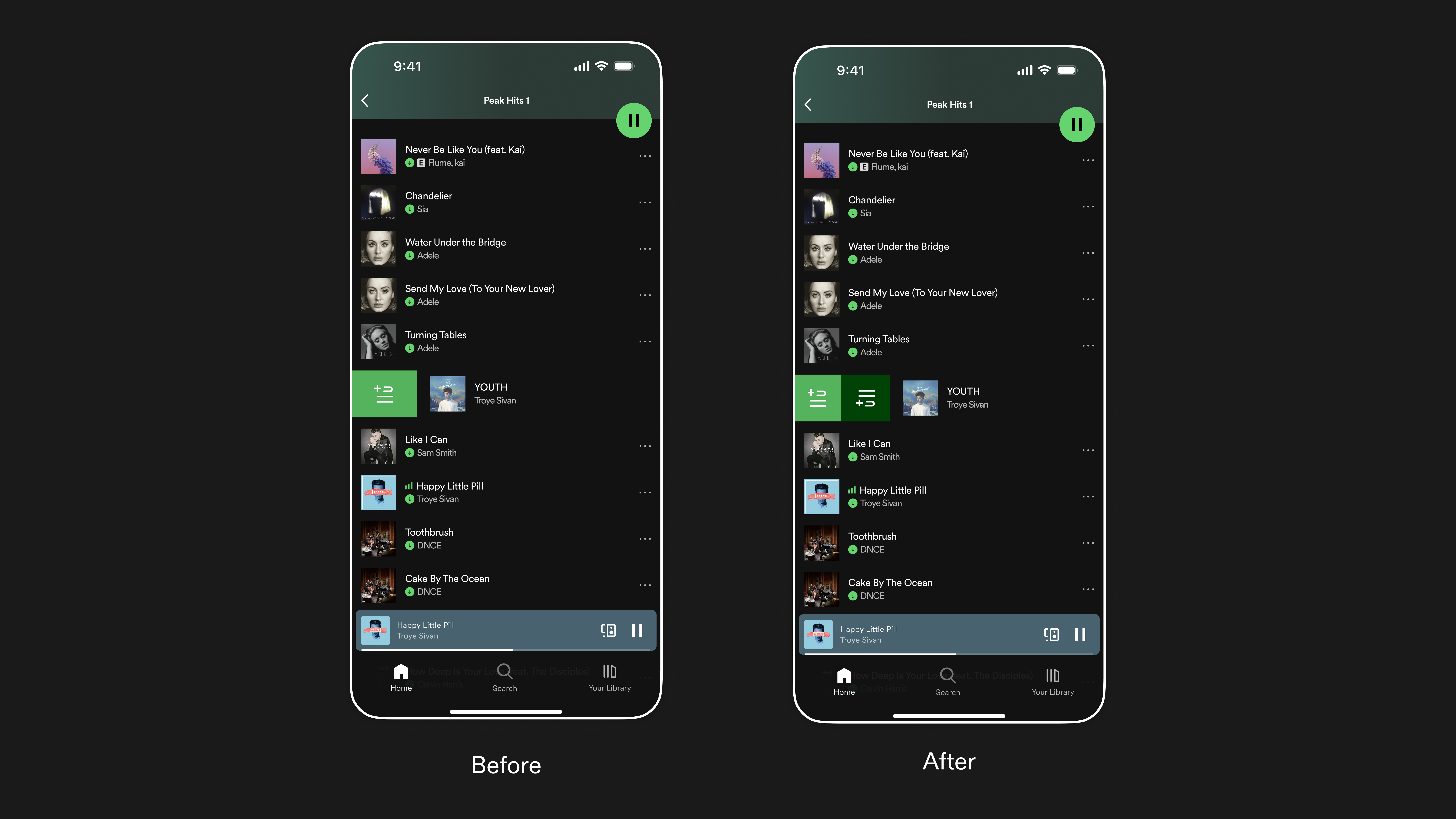
Enhancing the current right-swipe to include functionality for both queue actions
Largely inspired by the swipe actions functionality in Apple Music, I morphed Spotify's current right-swipe feature to give users the option of adding a song to the top or bottom of the queue. Given that the add to queue option comes second to play next, I gave it a darker green background to emphasize the distinction.
Action Toolbar
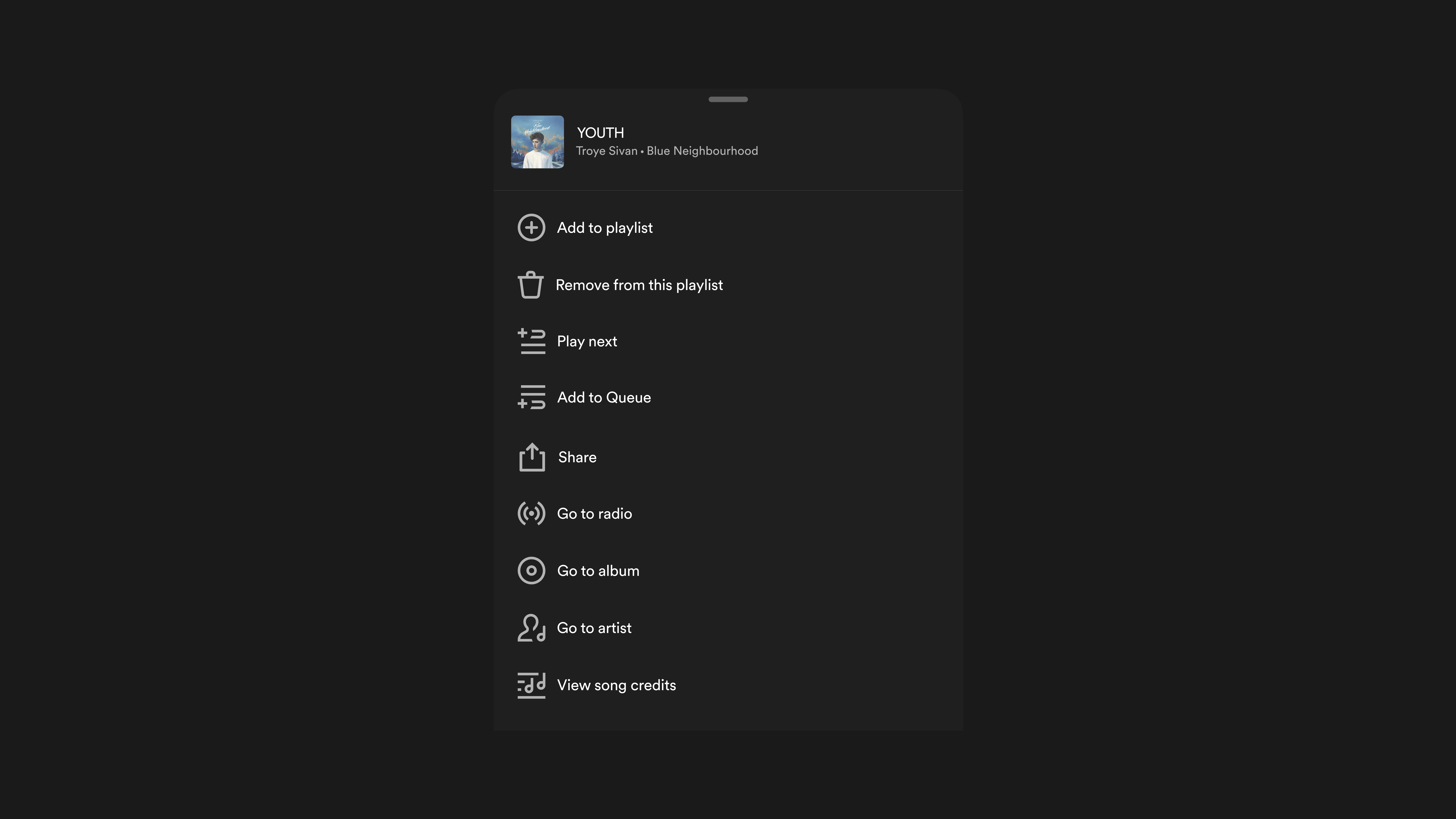
Modifying the options in the current action toolbar to support new functionality
By simply adding the "Play next" feature on top of the "Add to Queue" and using the new icon, users can quickly understand the new functionality and have access to it quickly if swiping right isn't something they usually do.
Prototypes
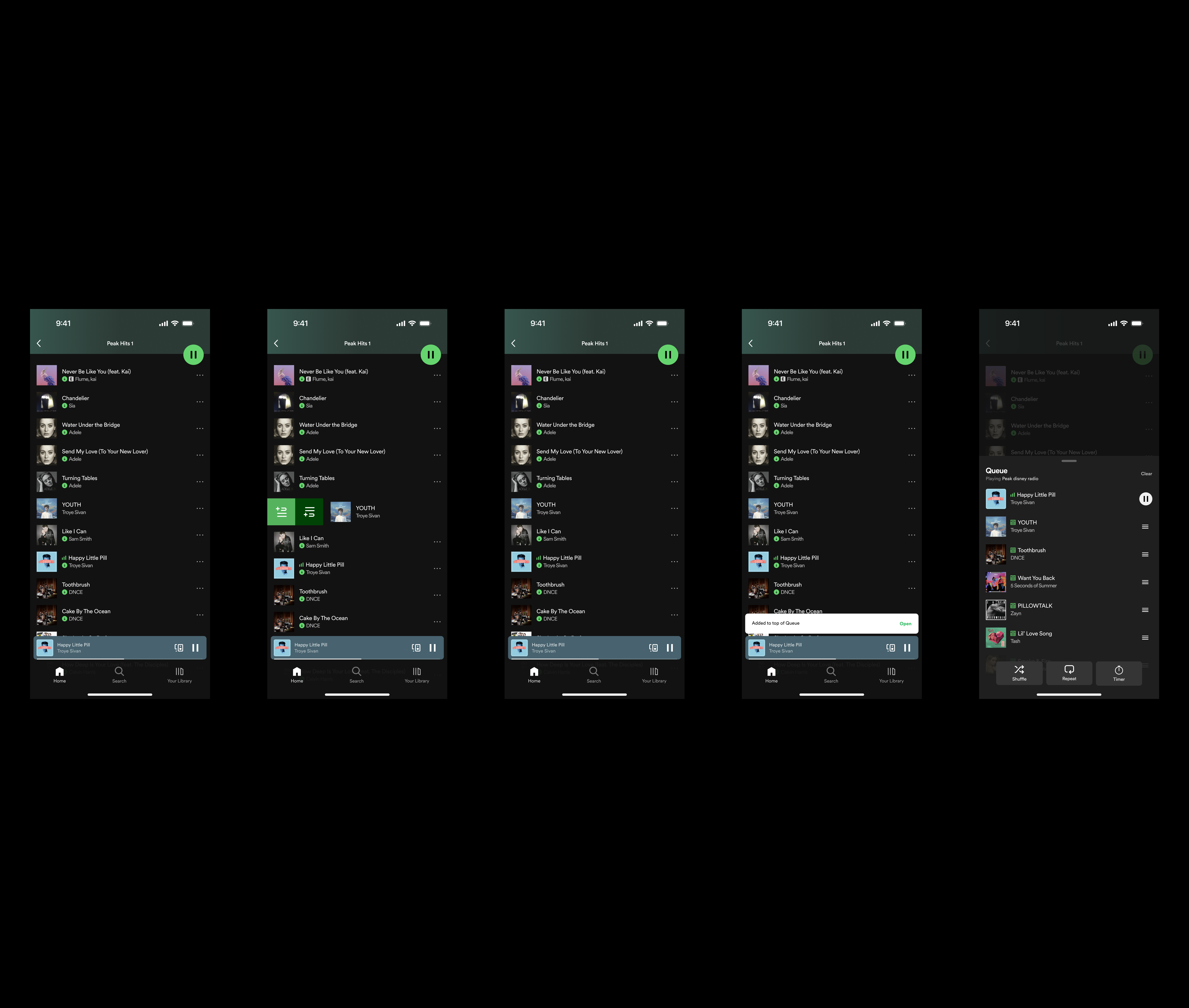
Flow 1 – Swipe actions

Flow 2 – Action toolbar
Reflecting
It is certainly a minor change, but to me, it is quite meaningful. I think a lot about friction when it comes to user experiences and believe it is not something to shy away from. Not every product can be filled to the brim with addicting content forcing you to stay engaged. Some have to implement design choices to keep users conscious of where they are, what they are doing, and why what they are experiencing is valuable.
Spotify's current queue system is not that, however. It is clearly something meant to be frictionless, as the queuing ability can currently be activated by the swipe and press of one button. This minimalist interaction is meant to be easy and simple, but it cannot overcome the final hurdle. It fails to consider a major use case for streaming and leaves users needing to tap, scroll, hold, and tap again.
My feature addition is far from an earth-shattering one. It already exists within the app of Spotify's direct rival, Apple Music. However, I think that this is a perfect start to 52. It combines almost all the disciplines of design work I value the most:
1) consumption – what 'good design' to I come across and what is extremely successful? What leaves me wanting more?
2) sketching & wireframing – when I have an idea for a feature, what does it actually look like? what considerations must be made for the UI and the UX?
and finally, 3) production – with my coding background, can I actually produce the feature changes I previously only conceptualized? Even if it requires unconventional means, can it be done from my position as a consumer?
I was not able to code something too concrete or meaningful, but I learned a lot about the inner workings of my favorite Raycast extensions. I also learned more about the Spotify API and was forced to reckon with the reasons why the company may withhold from making their interface much more accessible to a wider range of use cases.
I am so excited to finally start this weekly practice. Since shifting my mind more to product than solely engineering, I have been more inspired than ever to hone my craft and create. This is only the beginning <3
Also, this scenario about Troye Sivan's Happy Little Pill and YOUTH is real. If you want the 2010s forgotten gems playlist, here you are :)
Colophon
Jake Archibald's SVG tool seriously came up clutch. I was able to copy SVG elements from Spotify's web player and convert them into downloadable SVGs for my wireframes. I would still probably working on this if it wasn't for this amazing website.
Thank you to Aditya for the advice when it came to making Spotify wireframes from scratch! His large-scale redesign case study is incredible and the idea to just design over screenshots is really simple yet clever.
Online forums & discussions about the Spotify API:
Discussions about hacks for clearing queues with the Android SDK
A Stack overflow forum on clearing the queue
Finally, documentation on how to contribute to a Raycast extension.